| |||
|

| Home > Astronomy > ACAM > ACAM observing commands |
ACAM observing commands
The syntax of the most useful commands is summarised below. For details,
see the
ACAM observing guide.
Sections below:
The system is sensitive to the case of the command, but not to that of the parameters - it will respond to: acamslit ACAM_0.5 or to: acamslit acam_0.5 but not to: ACAMSLIT ACAM_0.5 Type '&' after a command to recover the prompt immediately after issuing a command, e.g.: multrun acam 5 300 "title" & (useful if you want to issue further commands while the initial command is being executed). To put in the background a currently-executing command (e.g. to get the prompt back), type ctrl/z. To bring it back to the foreground, type fg. 1 - Instrument control
agacam             Position the largefeed flat mirror in the
                   A&G box to transmit light from the sky to ACAM
                   (abbreviation for agmirror largefeed)

acamcal            Position the smallfeed flat mirror in the
                   A&G box to transmit light from the calibration lamps
                   to ACAM
                   (abbreviation for agacamcal, or agmirror smallfeed)

acamimage SlnR     Configure ACAM for imaging through the Sloan r filter.
                   This filter can be in either of the
                   filter wheels, or in the focal-plane slide.
                   The command is not case-sensitive.

acamimage SlnR 1   Configure ACAM to image the 1-arcsec slit through the
                   Sloan r filter (useful during spectroscopic
                   acquisition).  The allowed slits are 0.5, 0.75, 1,
                   1.5, 2, 10 and mask.  acamimage SlnR 1.0 won't work.
                   The command is not case-sensitive.

acamspec V400 1    Configure ACAM for spectroscopy, using the V400
                   grism, and a 1-arcsec slit.  For e.g. the 0.5-arcsec
                   slit, type acamspec V400 0.5.
                   See above paragraph for available choice of slits
                   (and likewise, acamspec V400 1.0 won't work).
                   Optionally a filter can also be requested, by giving
                   its name as a third parameter on the command line.
                   The command is not case-sensitive.

acamslit ACAM_0.5  Select 0.5-arcsec slit.  The allowed options are
                   clear, ACAM_0.5, ACAM_0.75, ACAM_1, ACAM_1.5,
                   ACAM_2, ACAM_10, mask.  Note the lack of decimals
                   in the names of slits with widths 1, 2 and 10 arcsec.

NB the acamimage and acamspec commands move whichever of the 3 mechanisms
(slit slide and 2 wheels) need moving,
and apply the relevant telescope focus offset.


acamslit -p 2      Select slit position 2 (range 1 - 8) - this
                   is equivalent to the above

acamwh1 3          Move filter wheel 1 to position 3 (range 1 - 7
                   usually)

acamwh2 7          Move filter wheel 2 to position 7  (range 1 - 7
                   usually)

acamwh2 BESU       Move filter wheel 2 to position of Bessell U filter
                   (the name is as given in the ING filter database)
The following commands can be used to initialise mechanisms:
acamslitinit, acamwh1init, acamwh2init.
To stop a mechanism, use: acamslitstop, acamwh1stop, acamwh2stop 2 - CCD setup
window acam 1 "[1:2148,800:3300]"
                   Set up standard readout window - this one
                   is useful for both imaging and
                   spectroscopy

rspeed acam slow   Set readout speed slow (23 sec for 2k * 2k readout)
                   or fast (14 sec for 2k * 2k readout)

bin acam 1 1       Set binning in x and y dirctions (in spectroscopy
                   mode, wavelength changes with y, ~ 3.3 A / pixel)

scripts/acam/acamw1  Enable window 1, after disabling window 2

scripts/acam/acamw2  Enable window 2, after disabling window 1
In the event of data-acquisition problems, try:
dasreset acambut remember to reset the window, speed and binning afterwards. The following commands are useful before and after override observations:
acaminit fast 1 1  Save the current ACAM instrument configuration,
                   sets up CCD with standard window [1:2148,800:3300]
                   fast (or slow) readout and binning 1 (or 2 or 3)
                   in each of x and y directions

acamend            Restores previous ACAM setup, removes ACAM mirror and
                   takes 5 biases

acamend nobias     As above, but takes no biases
3 - Data acquisition
glance acam 20     Take 20-sec exposure, store it as s1.fit
                   (no FITS headers)

run acam 20 "title"
                   Take 20-sec exposure, store as rnnnnnnn.fit.
                   If title is omitted, the TCS object name is used
                   in the observing log and the FITS headers.

multrun acam 5 300 "title"
                   Take 5 300-sec exposures
NB when using multdither or mcol (below) with autoguiding, consult with
the telescope operator about the size of dither step to be used, to
ensure that the dither doesn't move the guide star out of the
autoguide window.
multdither acam 9 300 5 auto_on "title"

                   Take 9 dithered 300-sec exposures, step size 5 arcsec,
                   with autoguiding (auto_off to observe without autoguiding)

multdither acam 9 300 5 auto_on "title" DEBUG
                   Same as above, but without taking data
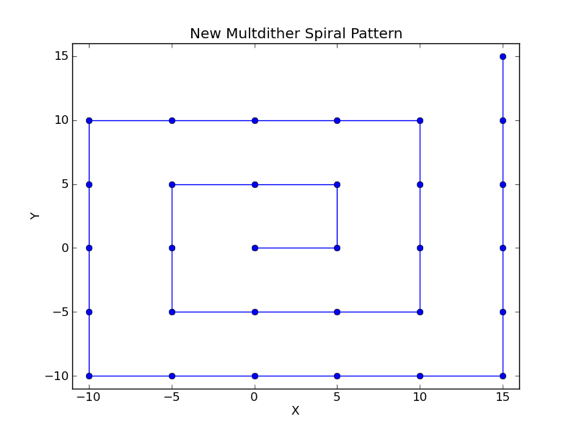
The spiral dither pattern used by multdither (and mcol) is shown
here.
mcol acam "title" on 5 "SlnZ,10,300,auto_on" "BESI,5,100,auto_on"

                   Take multiple dithered exposures through each of the
                   specified filters.  'on' specifies dithering on, and
                   5 is the step size in arcsec.
                   Each block delimited by double quotes specifies
                   a filter name, the number of exposures, the duration
                   in sec of each exposure and the autoguider status
                   (auto_on or auto_off).

                   In the above example, a dithered exposure is first
                   taken through the Sloan z filter, then a dithered
                   exposure through Bessell I filter (i.e. not
                   an exposure through each filter at dither point 1,
                   then an exposure through each filter at dither
                   point 2 etc.).

                   To interrupt mcol, use ctrl/c.


mcol acam "title" "SlnZ,2,3,auto_off" "BESI,2,3,auto_off"

                   As above, but with no dithering (both parameters 'on'
                   and '5' omitted) and no autoguiding, and only 2 exposures
                   of 3 sec each

bias acam          Take bias frame

multbias acam 10   Take 10 bias frames

newtime acam 600   Change requested exposure time to 600 sec

finish acam        Finish exposure now, keep data

abort acam         Finish exposure now, don't keep data.  If issued
                   during a multrun, this should terminate the multrun.
                   (See start of page for advice on how to get the prompt
                   back if a multrun is currently in progress.)

saveccd acam file  Save speed, window and binning settings to a named file

setccd acam file   Restore above settings from named file

unsetccd acam      Restore default settings (those applied on system startup)


acamcalor opt      Script used (usually in connection with override
                   observations) to obtain default calibration data.
                   Takes 3 exposures with the W flat lamp on, and
                   2 exposures with the CuAr and CuNe lamps on
                   (possible when an optical instrument, or no instrument,
                   is mounted at the Cassegrain focus.

acamcalor nir      Same as above, but used when a near-IR instrument
                   (usually LIRIS) is mounted at Cassegrain,
                   in which case the CuAr lamp is unavailable.
The commands flat, sky and arc (and multflat, multsky and multarc)
do exactly the same as run (and multrun) except that the value of the
OBSTYPE FITS header is changed accordingly.
4 - Telescope focus correction
acam_focus disable

acam_focus enable
By default, the telescope focus correction is enabled. |
| Top | Back |
|