CORRECTING THE MECHANICAL POSITIONING OF THE WHEELS
From time to time the position and tilt of the slit, grism and pupil wheels should be
measured more precisely, especially when mechanical interventions in
the entrance wheel have taken place.
WARNING: the following procedures are relatively risky.
Feel encouraged to seek help from engineers or instrument specialist.
In case the slit is tilted with respect
to the detector columns the wheel has to be rotated until properly aligned using EPICS.
- Check that the telescope is pointing to zenith.
- Check that the primary mirror petals are open.
- Check that the tertiary mirror is out (i.e. light to CASS focus), specially after a GLAS run.
- Switch on the weak dome flat lamp (at full intensity):
SYS> fflamp 1 on
- Check that the agmirror is out. If not:
SYS> agmirror out
- Take an image of the problematic slit (l0p75 in this example):
SYS> limage hc
SYS> lslit l0p75
SYS> glance liris 3
- If there is some misalignment, then start EPICS (WARNING:
the following procedure is relatively risky. Feel encouraged to seek the help from engineers or instrument specialist):
SYS> start_epics
In the EPICS window, clic on "LIRIS" (at the ENGINEERING column),
then clic on "SLIT", then clic on "
MOTOR". From the last window that shows up, write down the current VAL
value (your VALinitial) .
- Introduce some small value (~0.05) in the box next to TWV,
press return and then click on TWF (to move the slit wheel down) or
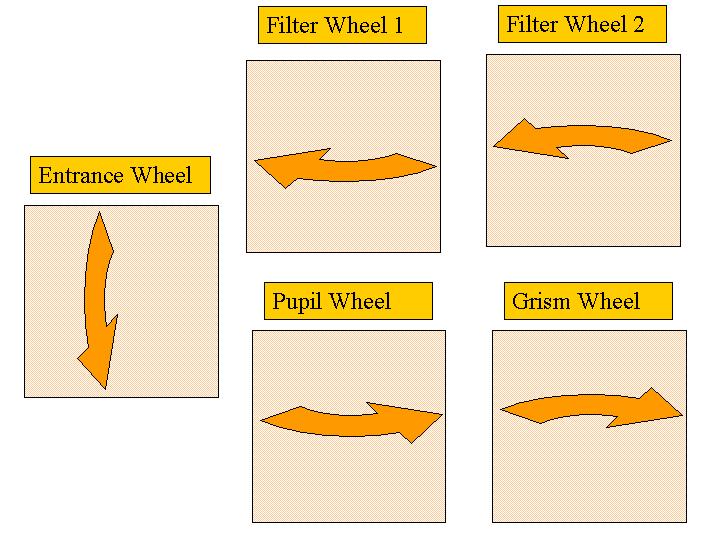
TWR (to move the slit wheel up). The 'slit wheel' moves as shown by the
'entrance wheel' in this diagram. Then:
SYS> glance liris 3
and iterate until you get a good alignment. Then write down the new VAL
value (your VALfinal).
The VARIATION ANGLE (same as the 'distance' value that will be requested in step 11) is the result of the final
VAL minus the initial VAL
(distance=VALfinal-VALinitial).
- Make and cd into a new directory following the date, such as:
SYS> mkdir /home/whtobs/liris/slits20080610
SYS> cd /home/whtobs/liris/slits20080610
- Get the present position of the slit wheel:
SYS> lbuild_mch_hometables lslit_config.dat lslit_distance.dat -home1
lslit_home1.dat.old -home2 lslit_home2.dat.old -dir /wht/etc/
- Modify it with the new values (in the directory you just created)
The following will ask you the position to change (0=quit): Look at
taurus:/wht/var/lslit_home1.dat to check which line number corresponds to the problematic slit. The line
number will be the position to change.
SYS> lbuild_mch_hometables lslit_config.dat lslit_distance.dat
-home1 lslit_home1.dat -home2 lslit_home2.dat -distf lslit_distance.dat -chpos -dir /wht/etc/
Now it will ask you to introduce the variation angle (distance); type the value you previously calculated
(the result of VALfinal-VALinitial).
Finally, type 0 to quit the script.
NOTE: The described procedure affects ONLY the slit at position. If you want to change the position of
the home mark (therefore changing EVERY slit by the same amount), type -1 when asked about the position to
change (0=quit).
- Now, copy the files to where they belong and load the new configuration:
SYS> cp lslit_home1.dat /wht/var/
SYS> cp lslit_home2.dat /wht/var/
SYS> lloadconfig slit
Log in to taurus as lirissm (you will need the password):
SYS> ssh taurus -l lirissm
Set the current directory:
SYS> cd /wht/etc/liris
Rename the old file:
SYS> mv lslit_distance.dat lslit_distance_pre_yyyymmdd.dat
Copy new version:
SYS> cp /home/whtobs/liris/slitsyyyymmdd/lslit_distance.dat .
Once finished, exit from the lirissm account:
SYS> exit
- To be sure the file is loaded correctly reboot the LIRIS IOC VME crate (located on the telescope) by pressing
the red reset button on the CPU card inside the VME. After that, in the ICS screen give the commands:
SYS> lsethome all
NOTE: It will take more than 10 minutes to set the wheels at home position.
SYS> lcamera camerain
- Once you have finished close the EPICS windows by clicking on the cross at the top right corner
of each window.
In case the spectra are tilted with respect
to the detector columns the grism wheel has to be rotated until alignment using EPICS.
- Check that the telescope is pointing to zenith.
- Check that the primary mirror petals are close.
- Check that the tertiary mirror is out (i.e. light to CASS focus), specially after a GLAS run.
- Turn the arc lamps on (Ar or Xe):
SYS> llampon 1
- Check that the agmirror is in. If not:
SYS> agcomp
- Take an arc with the problematic grism (lr_zj in this example):
SYS> lspec lr_zj l0p75
SYS> glance liris 3
- If there is some misalignment, then start EPICS (WARNING:
the following procedure is relatively risky. Feel encouraged to seek the help from engineers or instrument specialist):
SYS> start_epics
In the EPICS window, clic on "LIRIS" (at the ENGINEERING column) ,
then clic on "GRISM", then clic on "
MOTOR".
From the last window that shows up, write down the current VAL value
(your VALinitial).
- Introduce some small value (~0.05) in the box next to TWV, press return
and then click on TWF or TWR (check this diagram for directions). Then:
SYS> glance liris 3
and iterate until you get a good alignment. Then write down the new VAL
value (your VALfinal).
The VARIATION VALUE will be the new VAL minus the initial
VAL (VALfinal-VALinitial).
- Make an cd into a new directory following the date, such as:
SYS> mkdir /home/whtobs/liris/grisms20080610
SYS> cd /home/whtobs/liris/grisms20080610
- Get the present position of the grism wheels:
SYS> lbuild_mch_hometables lgrism_config.dat lgrism_distance.dat
-home1 lgrism_home1.dat.old -home2 lgrism_home2.dat.old -dir /wht/etc/
- Modify it with the new values (in the working directory)
The following will ask you the position to change (0=quit). Look at
taurus:/wht/var/lgrism_home1.dat to check which line number corresponds to the problematic grism.
The line number will be the position to change.
SYS> lbuild_mch_hometables lgrism_config.dat lgrism_distance.dat -home1
lgrism_home1.dat -home2 lgrism_home2.dat -distf lgrism_distance.dat -chpos -dir /wht/etc/
Now it will ask you to introduce the variation value (distance). Type the
VAL you previously calculated (the result of VALfinal-VALinitial).
Finally, type 0 to quit the script.
NOTE: The described procedure affects ONLY the grism at position. If you want to change the position of
the home mark (therefore changing EVERY grism by the same amount), type -1 when asked about the position to
change (0=quit).
- Now, copy the files to where they belong and load the new configuration:
SYS> cp lgrism_home1.dat /wht/var/
SYS> cp lgrism_home2.dat /wht/var/
SYS> lloadconfig grism
Log in to taurus as lirissm (you will need the password):
SYS> ssh taurus -l lirissm
Set the current directory:
SYS> cd /wht/etc/liris
Rename the old file:
SYS> mv lgrism_distance.dat lgrism_distance_pre_yyyymmdd.dat
Copy new version:
SYS> cp /home/whtobs/liris/grismsyyyymmdd/lgrism_distance.dat .
Once finished, exit from the lirissm account:
SYS> exit
- To be sure the file is loaded correctly reboot the LIRIS IOC VME crate (located on the telescope) by pressing
the red reset button on the CPU card inside the VME. After that, in the ICS screen give the commands:
SYS> lsethome all
NOTE: It will take more than 10 minutes to set the wheels at home position.
SYS> lcamera camerain
- Once you have finished close the EPICS windows by clicking on the cross at the top right corner
of each window.
From time to time, the alignment of every pupil stop should be checked.
- Check that the telescope is pointing to zenith.
- Check that the primary mirror petals are open.
- Check that the tertiary mirror is out (i.e. light to CASS focus), specially after a GLAS run.
- Switch on the weak dome flat lamp; set it at 50% intensity:
SYS> fflamp 1 on
SYS> fflampspwm 50
- Set the camera to reimaging mode in h filter and pupil for ks band (in this example):
SYS> limage h
SYS> lcamera reimaging
SYS> lpupil pcblnkxl
- Check that the agmirror is out. If not:
SYS> agmirror out
- Take an image:
SYS> run liris 1 "pupil"
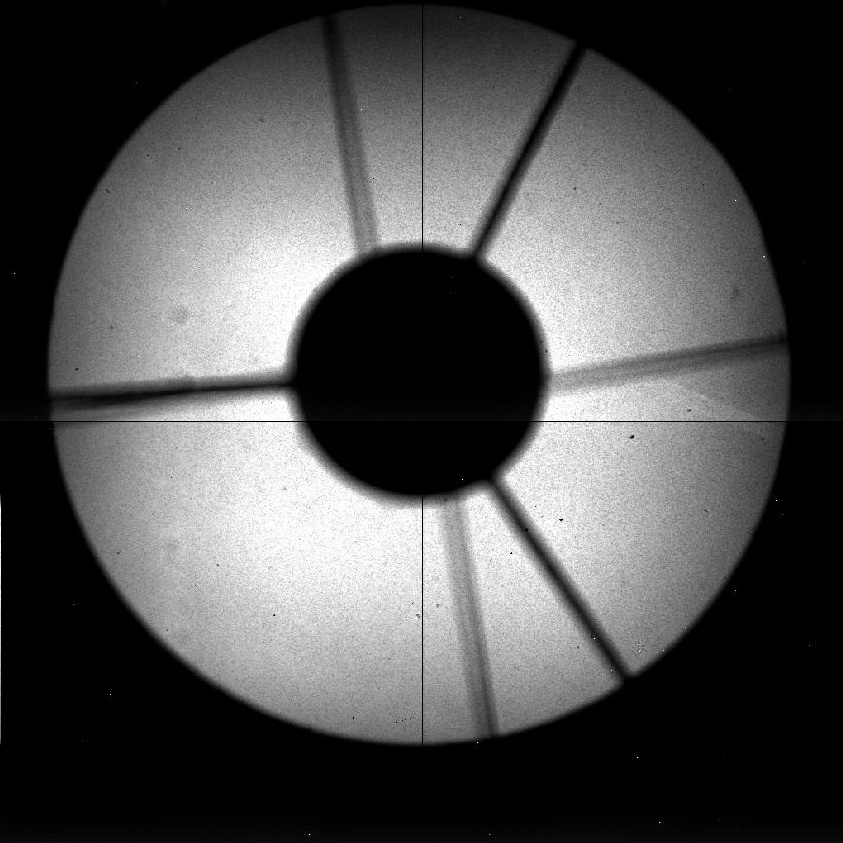
- Take a look at the image. You should see an image (like this one) of the primary
mirror+the shadow of both the secondary and its spider+the shadow of the K pupil (a round spot in the centre plus 3 legs).
- If it is well centered (that is, if the pupil is correctly masking the shadow of the secondary mirror), then you
only need to set back the observing mode by doing:
SYS> lcamera camerain
and the check finishes here.
- If there is some misalignment, then you need to proceed as described in the following steps.
- Start EPICS (WARNING: the following procedure is relatively risky.
Feel encouraged to seek the help from engineers or instrument specialist):
SYS> start_epics
In the EPICS window, clic on "LIRIS" (at the ENGINEERING column),
then clic on "PUPIL", then clic on "MOTOR".
From the last window that shows up, write down the current VAL value
(your VALinitial).
- Introduce some small value (~0.05) in the box next to TWV, press return
and then click on TWF or TWR (check
this diagram see the direction). Then reimage the pupil:
SYS> glance liris 1
and iterate until you get a good alignment. Then write down the new VAL
value (your VALfinal).
The VARIATION VALUE or distance will be the new VAL minus the initial
VAL (VALfinal-VALinitial).
- Make and cd into a new directory following the date, such as:
SYS> mkdir /home/whtobs/liris/pupils20080610
SYS> cd /home/whtobs/liris/pupils20080610
- Get the present position of the pupil wheels:
SYS> lbuild_mch_hometables lpupil_config.dat lpupil_distance.dat
-home1 lpupil_home1.dat.old -home2 lpupil_home2.dat.old -dir /wht/etc/
- Modify it with the new values (in the working directory)
The following will ask you the position to change (0=quit): Look at
taurus:/wht/var/lpupil_home1.dat to check which line number corresponds to the problematic pupil. The line
number will be the position to change.
SYS> lbuild_mch_hometables lpupil_config.dat lpupil_distance.dat
-home1 lpupil_home1.dat -home2 lpupil_home2.dat -distf lpupil_distance.dat -chpos -dir /wht/etc/
Now it will ask you to introduce the variation value: Type the VAL you
previously calculated (the result of VALfinal-VALinitial).
Finally, type 0 to quit the script.
NOTE: The described procedure affects ONLY the pupil at position. If you want to change the position of
the home mark (therefore changing EVERY pupil by the same amount), type -1 when asked about the position to
change (0=quit).
- Now, copy the files to where they belong and load the new configuration:
SYS> cp lpupil_home1.dat /wht/var/
SYS> cp lpupil_home2.dat /wht/var/
SYS> lloadconfig pupil
Log in to taurus as lirissm (you will need the password):
SYS> ssh taurus -l lirissm
Set the current directory:
SYS> cd /wht/etc/liris
Rename the old file:
SYS> mv lpupil_distance.dat lpupil_distance_pre_yyyymmdd.dat
Copy new version:
SYS> cp /home/whtobs/liris/pupilsyyyymmdd/lpupil_distance.dat .
- Once finished, exit from the lirissm account:
SYS> exit
- Now, keep on checking the other pupils, such as e.g. pcblnk:
SYS> lpupil pcblnk
image it and repeat the procedure above.
- After finishing this procedure with all the pupils, to be sure that the files were loaded correctly,
reboot the LIRIS IOC VME crate (located on the telescope) by pressing the red reset button on the CPU card inside
the VME. After that, in the ICS screen give the commands:
SYS> lsethome all
NOTE: It will take more than 10 minutes to set the wheels at home position.
SYS> lcamera camerain
- Once you have finished close the EPICS windows by clicking on the cross at the top right corner
of each window.
|