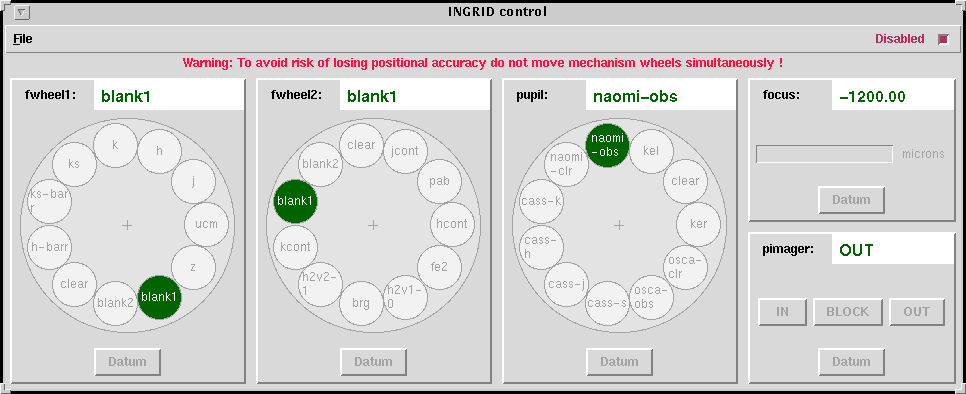
The RTD control panel (image below) includes several options which
allow the user to display either the post-read or the pre-read image extensions
or the post-pre (=post minus pre) image of a certain observation data.
Also, it is possible to display the result of subtracting
one image from another (e.g. a sky subtracted image).
This operation affects only the displayed data (i.e. only raw
data is stored on disk).
On the RTD control tool window, from top to bottom:
Back to the top
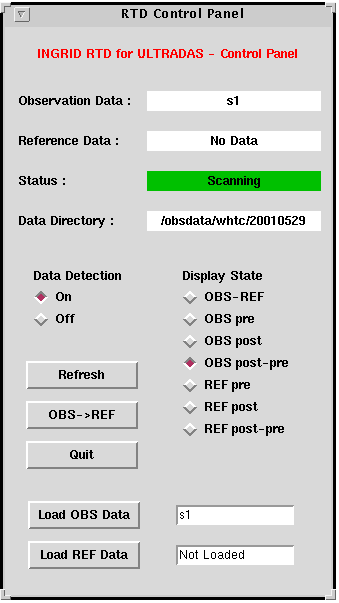
INGRID mechanisms comprises a pupil stop wheel, two filter wheels
(one for narrow band filters and another one for broad band filters), the focus drive and a pupil imager.3. INGRID mechanisms
The position of the filter wheels, the pupil stop wheel, the instrument
internal focus and the pupil imager can be checked by means of the
mechanisms' windows or using a line command:
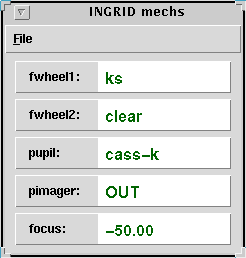
Mechanisms can be moved using either the GUI or the command line interface (pink window), however it is recommended to move them using the command line.
| < option > | Pupil stop wheel | Filter wheel 1 | Filter wheel 2 |
| blank | ---- | blank1 | blank1 |
| clear | clear | clear | clear |
| z | cass-j | z | clear |
| j | cass-j | j | clear |
| h | cass-h | h | clear |
| ks | cass-k | ks | clear |
| k | cass-k | k | clear |
| h-barr | cass-h | h-barr | clear |
| ks-barr | cass-k | ks-barr | clear |
| fe2 | cass-h | h | fe2 |
| brg | cass-k | ks | brg |
| kcont | cass-k | ks | kcont |
| hcont | cass-h | h | hcont |
| h2v1_0 | cass-k | ks | h2v1-0 |
| h2v2_1 | cass-k | ks | h2v2-1 |
| jcont | cass-j | j | jcont |
| pab | cass-j | j | pab |
Back to the top
IMPORTANT: Please, follow this
temporary procedure to focus INGRID until further notice. In summary, it consists of:
If the seeing is very good, repeat the telescope focus procedure with
smaller steps (e.g. 0.05mm).
Back to the top
The arguments above stand for
< int time> Integration time in seconds.
Back to the top
Back to the top
Type SYS>shutdownobssys on the pink window and wait until the prompt is back.
Most of the windows will disappear (the RTD, log, mechanism mimic, array info window, talker,identify window).
Type DAS>shutdownobssys
When observing with INGRID focusing is, in principle, a two step procedure
which involves focusing the telescope and then focusing INGRID
itself (i.e. changing the distance between the array and the INGRID foreoptics). 4. Focusing
However, in practice no focus improvement has been observed
over a wide range of instrument focus positions, so that it can be left at
a fixed position (consult your support astronomer; it is +50 at the moment (May 2003))
and only the telescope has to be focused at the beginning of each night.
(a) setting the INGRID focus to +50 microns, (b) focus the telescope with the
normal procedure (described below) but using only stars located in the center of the array, (c)
finally subtract -140 microns to INGRID internal focus.
Focusing the telescope
The best telescope focus value for observing
with INGRID is ~99.05mm (May 2003). Use this value as a starting point.
SYS> filter ingrid h
*Example:
SYS>coave ingrid 2, set to 2 the number of coaverages
(of the exposure time given below) performed in each image of the sequence.
In this case, nine files (e.g. r559685.fit, r559686.fit,...,r559693.fit)
would be saved on disk, corresponding each to a telescope focus value (starting
at 98.1mm with steps of 0.1mm) and obtained after coaveraging two 8s exposures.
SYS>focusrun ingrid 9 8 98.1 0.1
It is recommended to expose at least a total of 10-15s in each
image in order to average out seeings effects.
in>istarfocus r559685 nim=9
and follow the instructions (i.e. mark with an m one or more stars
in the image, type q and wait until an xgterm
appears showing
the fwhm and ellipticity plotted versus the telescope focus value
(in meters, m), and finally
type q again to find the best value). NOTE: The best telescope focus
value is given also in m.
SYS>focus 98.6
since the telescope focus is left to the last value of the sequence after running
focusrun.
A complete list and description of the commands can be found in the
command dictionary of the UltraDas Software manual.
A summary of the most commonly used commands is given here for a quick reference: 5. INGRID observing commands
Some of the most important commands related to data acquisition are listed below
(arguments are denoted by <>):
Sets the number of MNDR
(multiple non-destructive reads) to Nr and the number of coaverages to
N coav. Nr is the
number of times that the array is read not-destructively prior and
after an integration period.
The array data from the Nr pre and post-integration reads respectively are
averaged independently.
Nr is an integer between 1 and 16 (default is 1; i.e. correlated double
sampling). N coav is the number of accumulated
exposures that are averaged and written as a single output file.
Sets the number of
coaverages to N coav.
Produces
a sequence of <N> exposures of the required integration time. E.g.:
multglance ingrid 999 2 produces a sequence of 999 2s exposures.
The sequence
can be finished by pressing control-C.
Takes
a run and saves it in: rxxxxxx.fit.
E.g. run 8 "FS33 ks",
an 8 second exposure and store it in the output file (e.g. r240976.fit).The title
of the fits file is set to "FS33 ks". If the number of coaverages has previously been
set to 2 (i.e. coave ingrid 2 or rmode ingrid mndr 1 2)
the command run 8 "FS33 ks"
takes two 8 second exposures in succession, then coaverages the data before
storing in the output file (e.g. r240976.fit).
Takes
a run and set the OBSTYPE header parameter to DARK (arguments are described
below).
Takes a run and set the OBSTYPE header parameter to FLAT.
Takes an
exposure and saves it in s1.fit. This file is overwritten
when a new glance is taken.
Takes a run and saves it in: sk.fit.k is an integer within the range 1-99.
The scratch file sk.fit is
overwritten when a new scratch<k> is taken.
Same as run but repeats the run sequence m times and generates m
output files.
Same as flat but repeats the run sequence m times and generates m
output files.
Same as run but repeats the dark sequence m times and generates m
output files.
Takes n runs with the required integration time (and number
of coaverages previously set)
and moves the telescope between them using the quantities entered on < x offset>, <
y offset>. Each run is saved in a fits file (rxxxxxx.fit). n defines the
dither pattern and can assume the values 2, 3, 4, 5, 8 and 9. In all cases the telescope starts
and ends at the centre of the pattern.
Same as before, but with autoguided telescope at each dither position.
Run it after the TO has found a suitable
guide star and has done a "field".
< "title"> Title of the exposure recorded in the
image header (optional argument).
< x offset> Telescope offsets in arcsec.
< y offset>
Defines the aperture < number> characterized by
<ra offset> and <dec offset> arcsec offsets in RA and DEC respectively (e.g.
user "ENTER APERTURE 1 -400 0")
Offsets the telescope according to the previously defined aperture
Offsets the telescope by <ra offset> arcsec and <dec offset>
arcsec in RA and DEC respectively from the nominal position
Moves the telescope to the object <object_name> if this has previously
been loaded into the TCS
add
Adds the object <object_name> to the catalog 6. End of night
It is not necessary to shut down the observing system at the end of the night.
SYS>filter ingrid blank7. Shutting down the system
SYS>filter ingrid blank
on the DAS orange window corresponding to INGRID and wait until the
prompt is back.
Back to the top
NOTE: If you write the data tape with fitsinit/fitsout, use the mscrfits
command in the mscred IRAF package for reading the data. This is necessary because
INGRID images are multi extension images.
Back to the top
SYS>startrtd&
in>ilistdark r*.fit
SYS>filter ingrid blank
SYS>dark ingrid 10 "dark 10s"
This takes one dark frame of 10s exposure time and
the title of the FITS image is set to "dark 10s".
You can generate an observing script to get the dark frames for the
exposure lengths needed and then execute it from the command line.
8. Writing data tapes
A DDS tape (90m) should be able
to store 4.5 Gb (~540 files) whereas a DDS3 tape, ~12.5 Gb (~1500 files, ~2 o even 3
observing nights).
tar -cvf /dev/rmt/0lbn .
fitsinit and follow the instructions and answer the questions.
fitsout and answer the questions again.
9. Important notes
        APERTURE  OFFSETS                          OFFSETS  (ARC)

                N
      +------------------+  sky pa=180          +------------------+  sky pa=180
      |                  |                      |                  |
      |             ^    |                      |                  |
      |             | y  |                      |      x           |
      |             |    |                      |  *------>        |
   E  |             |    |                      |  |               |
      |       <-----*    |                      |  | y             |
      |         x    	 |                      |  |               |
      |             	 |                      |                  |
      |       	         |                      |                  |
      +------------------+                      +------------------+
 Last Updated: 15 December 2003
Almudena Zurita, azurita@ing.iac.es