
An E2V electron
multiplying ‘Low-Light-Level’ L3CCD is
available for use on the red or blue arm of
With this frame transfer
CCD it is
possible to drastically reduce the time lost to reading out the chip.
Charge is
first rapidly shifted into a storage buffer. While the change resides
in that
buffer and is being read out, the exposure can just continue on the
active CCD
area. In this way observing efficiency is maximized. During
most recent tests (July 2007) exposure
times of 0.229s using a 100 pixel-wide window over the full spectral
length
were achieved. Shorter exposure times are not possible as this is
the time needed to read the buffer.
2.2 Electron
multiplication and very low read noise
The
electron multiplication takes place in an extra
series of stages added to the serial register before the charge is
digitized.
These stages are clocked with higher than normal voltages,
which leads to an avalanche of several hundred or even thousands
of
electrons for each electron that is collected on the chip. This then
dwarfs the
normal read out noise (RON) produced by the amplifiers. The resulting
effective
RON is close to zero (0.028 e- in the fast mode of our system).
The
multiplication process introduces an adittional noise source called
multiplication noise (see Tulloc
2007).
In the detector noise limited regime (low signal levels) this loss is
more than compensated by the negligible read noise of the system, but
in the photon noise limited regime the multiplication noise reduce the
SNR of the observation by a factor of 21/2 which is
equivalent to say that the detector loses a factor of 2 in quantum
efficiency.
2.3 Problems: linearity and CIC.
There are two
special characteristics of L3CCDs that merit some attention.
Firstly, at high
count
levels non-linear behaviour occurs. The system is optimized to work
with faint
sources, so it is a good idea to keep the exposure time as low to work
always
in a linear regime (<15.000 ADU/pixel).
Secondly, the high-gain amplification process generates occasional rogue electrons. This is the so-called "clock induced charges" (CIC). CIC is produced in all CCDs, but are only noticeable in an L3CCD due to the electron multiplying stage. The effect is that several "bight" pixels, randomly distributed, appear in the image (see Fig. 1). The number of CIC electrons is independent of the exposure time. The best way to deal with is to median filter a number of identical images. Since the RON is very low this does not negatively impact on the signal-to-noise of the end result. The exposure time can be kept low in order to obtain a reasonable number of exposures within the required time resolution dictated by the scientific goals. An example of the end result is shown in Fig. 2.
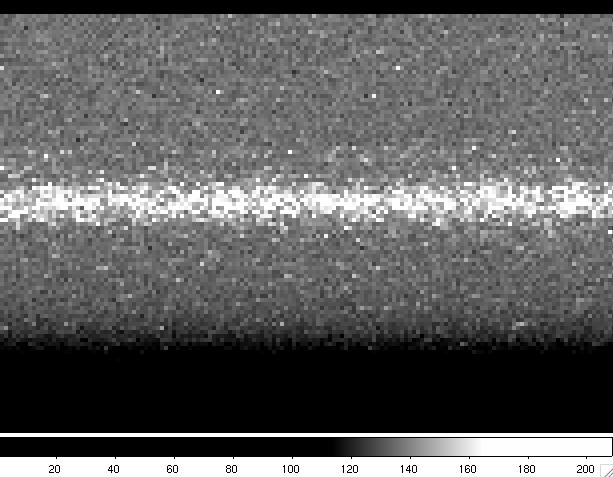
Fig. 1: Zoom of an individual spectrum of 0.229s exp. time. Notice the
CIC
events as bright pixels randomly distributed all over the image

Fig. 2: Zoom of a median combination of 11 spectra, each of 0.229s exp.
time. Notice that the CIC
events have disappeared.
The system has
two modes with different multiplying factors at the extended readout register, fast and slow, with
different gains (105 and 4.1 ADU/e) and RON (0.028 and 1.4e
respectively). To
take advantage of the almost 0 RON the best option is fast. But if the signal using the
lowest possible exposure time using the fast mode is higher than 15000
ADU/pixels
then the slow
mode is recommended because of the non-linear behaviour high count
levels and because the slow mode is less affected by CIC
events.
3.1
Spectral
resolutions and wavelength coverage
The spectrum is dispersed in the x axis. The L3CCD covers about 1/3 of the spectral range of that of the standard ISIS CCDs.
|
ISIS wavelength coverage and resolutions with
QUCAM2 in the blue arm
|
|||||||
|---|---|---|---|---|---|---|---|
|
Grating
|
Blaze
|
Dispersion (Å/mm)
|
Dispersion (Å/pix)
|
Total Spectral range (Å)
|
Unvignetted range (1024 pixels)
|
Slit-width for 54 mu at detector (in arcsecs)
|
Slit-width for 27 mu at detector (in arcsecs)
|
|
R158B
|
3600
|
120
|
1.56
|
1597
|
1597
|
0.8
|
0.4
|
|
R300B
|
4000
|
64
|
0.83
|
850
|
850
|
0.8
|
0.4
|
|
R600B
|
3900
|
33
|
0.43
|
440
|
440
|
0.9
|
0.45
|
|
R1200B
|
4000
|
17
|
0.22
|
225
|
225
|
1.1
|
0.55
|
|
H2400B
|
Holo
|
8
|
0.11
|
113 |
113
|
1.2
|
0.6
|
|
ISIS wavelength coverage and resolutions with
QUCAM2 in the red arm
|
|||||||
|---|---|---|---|---|---|---|---|
|
Grating
|
Blaze
|
Dispersion (Å/mm)
|
Dispersion (Å/pix)
|
Total Spectral range (Å)
|
Unvignetted range (1024pixels)
|
Slit-width for 54 mu at detector (in arcsecs)
|
Slit-width for 27 mu at detector (in arcsecs)
|
|
R158R
|
6500
|
121
|
1.57
|
1608
|
1608
|
0.84
|
0.42
|
|
R316R
|
6500
|
62
|
0.81
|
829
|
829
|
0.88
|
0.44
|
|
R600R
|
7000
|
33
|
0.42
|
430
|
430
|
0.97
|
0.48
|
|
R1200R
|
7200
|
17
|
0.26
|
266
|
266
|
1.24
|
0.62
|
Observing with the QUCAM2 on
4.1 Settings.
The
spectral
direction used with QUCAM2 is in the x-axis. Windowing in the y-axis
make
read-out faster. To have enough sky at both sizes of a point-like
source we
used a window of 100 pixel width in y-axis and covering the whole range
of the
x-axis. In our tests we used
SYS> window 1 qucam2 "[1:1072,540:639] "
Windowing also in the x-axis permits shorter exposure times but the
spectral
range of the spectrum will be also shorter.
4.2 Taking
spectra of the target.
All
UltraDAS
commands can be used as with the other CCD. But to continuously expose
while
reading the previous image the command to be used is rsrun.
rsrun performs a sequence of
exposures
for rapid spectroscopy on the camera, reads them out and saves the data
in a
FITS file containing the exposures in a sequence of FITS extensions.
The file
is passed to the archiving and logging facilities.
A
title may be given for the observation: the title appears as the datum
of the OBJECT
keyword in the FITS headers and as the target name in the observing
log. If no
title is given, the system attempts to read the target name from the
Telescope
Control System (TCS): this makes the value for the OBJECT
keyword the
same as that for the CAT-NAME keyword. If the TCS does not
respond, then
the title defaults to "(object not named)".
rsrun [<camera>|<instrument>] <number-of-exposures> <exposure-time> ["<title>"]
multrsrun [<camera>|<instrument>] <n-obs> <number-of-exposures> <exposure-time>
where number-of-exposures
is the
required number of exposures in the sequence, exp-time is in
seconds and
n-obs is the number of cycles in a multrsrun. The
title-string
must be enclosed in double quotes.
Example:
rsrun red 127 1 "rapid spectroscopy run"
performs a series of 127 one
second integrations.
Notice that
the
mechanical shutter is always open, thus if you use exp-time=0 the real
exp.
time depends on the time needed to make the full frame transfer (0.229s
using a
[1:1072,540:639] window)

Arcs and
bias can be
obtained in the usual way. Flat fields have to be obtained at
low-signal levels
(less than 10000ADUs), so to attaing good S/N several flat fields are
needed.
 |
Last Updated: September 2007
Javier Licandro, licandro@ing.iac.es |