
This is a full frame transfer CCD, thus it is possible to read it very fast and maximises the observing efficiency since the camera is exposing even during readout of the previous frame. In the las tests we made we were able to do exposure times of 0.229s using a [1:1072,540:639] window.
2.2 Electon multiplying
system with almost 0 ron.
This is also an electron multiplying system. They have an extra
series of stages added to the serial register before the charge reaches
the amplifier. This stages are clocked with higher than normal voltages
which creates a significant probability that one electron will generate
another as the charges are moved from stage to stage so a single
electron lead to an avalanche of several hundred or even thousands of
electrons. This dwarf the read out noise (ron) produced by the
amplifiers, thus the ron is almost 0 (0.028 e- in the fast mode of our
system).
2.3 Problems:
linearity and CICs.
The system has two problems. First is the non-linearity at high
count levels. The system is designed to work wit faint sources, so it
is a good idea to keep the exposure time as low as possible to work
always in a similar regime.
The other problem are the so called "clock induced charges" (CICs).
These are spontaneously produced electrons during clocking. CICs are
produced in all CCDs, but are only a problem in an L3CCD due to the
electron multiplyin stage. The effect is that several "bight" pixels
randomly distributed, appear in the image (see Fig. 1). The number of
CICs is independent of the exposure time, each image will have a
similar number of CICs but at different pixel positions. So, the
best way to deal with is, again, to keep the individual exposure time
as lower as possible, anf as the ron is almost 0, then combine the
large number of images possible to attain the needed time resolution as
in Fig. 2.
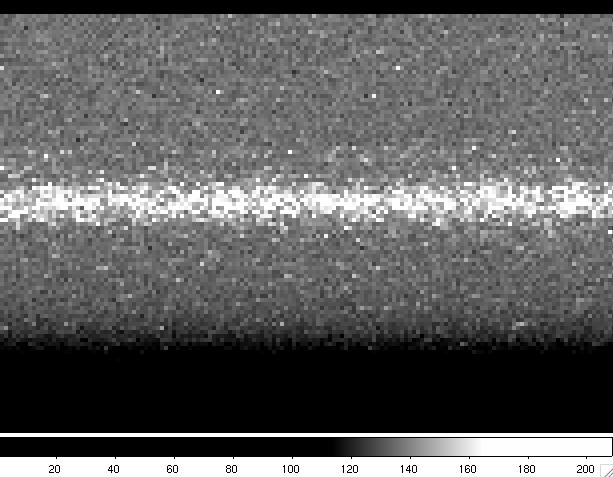
Fig. 1: Zoom of an individual spectrum of 0.229s exp. time. Notice the
CICs ("bright" pixels randomly distributed all around the image).

Fig. 2: Zoom of 10 spectra, each of 0.229s exp. time. Notice that
CICs
2.3 Two observing
modes.
The system has two modes with different multiplying factors, fast and
slow. To take advantage of the almost 0 ron the best option is "fast".
The "slow" mode is less affected by CICs, but it is only recommended if
the signal using the lowest possible exposure time is higher than
20e/pixel.
"Fast" mode can be used also as a "photon counting" detector if the
signal is slower than 0.2e/pixel. We still did not test this.
3.1 Spectral
resolutions and wavelength coverage
The spectrum is dispersed in the x axis. Even if the L3CCD is about 1/4 size respect to the "normal" CCDs used on ISIS, the spectrum is not vignetted so the spectral coverage is about 1/3 of that of the normal CCDs.
|
ISIS wavelength coverage and resolutions with
QUCAM2 in the blue arm
|
|||||||
|---|---|---|---|---|---|---|---|
|
Grating
|
Blaze
|
Dispersion (Å/mm)
|
Dispersion (Å/pix)
|
Total Spectral range (Å)
|
Unvignetted range (1024 pixels)
|
Slit-width for 54 mu at detector (in arcsecs)
|
Slit-width for 27 mu at detector (in arcsecs)
|
|
R158B
|
3600
|
120
|
1.56
|
1597
|
1597
|
0.8
|
0.4
|
|
R300B
|
4000
|
64
|
0.83
|
850
|
850
|
0.8
|
0.4
|
|
R600B
|
3900
|
33
|
0.43
|
440
|
440
|
0.9
|
0.45
|
|
R1200B
|
4000
|
17
|
0.22
|
225
|
225
|
1.1
|
0.55
|
|
H2400B
|
Holo
|
8
|
0.11
|
113 |
113
|
1.2
|
0.6
|
|
ISIS wavelength coverage and resolutions with
QUCAM2 in the red arm
|
|||||||
|---|---|---|---|---|---|---|---|
|
Grating
|
Blaze
|
Dispersion (Å/mm)
|
Dispersion (Å/pix)
|
Total Spectral range (Å)
|
Unvignetted range (1024pixels)
|
Slit-width for 54 mu at detector (in arcsecs)
|
Slit-width for 27 mu at detector (in arcsecs)
|
|
R158R
|
6500
|
121
|
1.57
|
1608
|
1608
|
0.84
|
0.42
|
|
R316R
|
6500
|
62
|
0.81
|
829
|
829
|
0.88
|
0.44
|
|
R600R
|
7000
|
33
|
0.42
|
430
|
430
|
0.97
|
0.48
|
|
R1200R
|
7200
|
17
|
0.26
|
266
|
266
|
1.24
|
0.62
|
A title may be given for the observation: the title appears as the datum of the OBJECT keyword in the FITS headers and as the target name in the observing log. If no title is given, the system attempts to read the target name from the TCS: this makes the value for the OBJECT keyword the same as that for the CAT-NAME keyword. If the TCS does not answer, then the title defaults to "(object not named)".
rsrun [<camera>|<instrument>] <number-of-exposures> <exposure-time> ["<title>"]
multrsrun [<camera>|<instrument>] <n-obs> <number-of-exposures> <exposure-time>where number-of-exposures is the required number of exposures in the sequence, exp-time is in seconds and n-obs is the number of cycles in a multrsrun. The title-string must be enclosed in double quotes.
rsrun red 127 1 "rapid spectroscopy run"performs a series of 127 one second integrations.

 |
Last Updated: Agust 2007
Javier Licandro, licandro@ing.iac.es |