UADSA_ED The Time Keeping Editor
uadsa_ed is the editor provided for the whole uadsa program. It is an GUI screen
with al sorts of klick buttons to make you life easier.
This editor gives you the opertunity to fill in every half an hour of the day
you are working in. If you click on the hour you will get an pop-up window which
gives you the abelity to change that hour. You will find that during the night
hours the selection possebilities are different from the ones during day-time.
Locically because I don't thing you gone take any toil at 3:00 in the morning. Or
being sick at 4:00 in the morning and if you get sick at 23:00 in the evening you better
have a good talk with your wife.
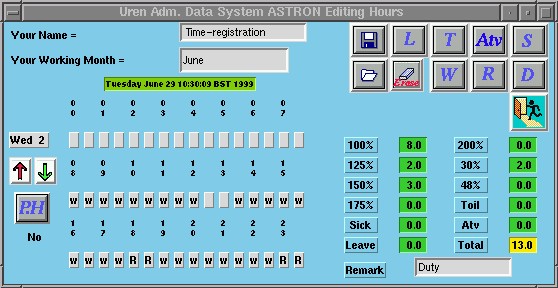
On the right-hand corner you see several click buttons. These buttons can be
pressed whenever you think it consernes a whole day. For instance if you click the
button marked "L" it will fill in the day as a complete leave day. Meaning from 08:00
in the morning untill 17:00 in the afternoon will be filled with "L".
If you have finisched that day then please click on the "disk" button to save that
information. If you don't save and move on to the next day, you then lose the information
from the day before. Why it is done this way is because you might play around with it
with-out saving the information. On the other hand its an day editor not a month editor.
Just play with it and found out how it works. I can explain every single button but
the best way to learn is to do it. Don't be afraid, if you are able to disroy any-thing
then I'm (the programmer) at fault.
Summary of what the buttons do mean or do ;
- Button with Disk ; After you have made a change to a day use this button to save
you have to save it before you go on to the next day otherwise you will lose your
changes to that day.
- Button with folder; You use this button to load a month
file which you have specified in the field "Your Working Month". Month and year has to be
given in xx yyyy. White xx month number and yyyy the year number.
- Button with "L"; If you have taken or gone take a leave
press this button and it will handle your request.
- Button with "T"; Same for this one, if you decide to take
a days toil then use this button.
- Button with "Atv"; Atv, these called Adv is a special dutch
thing. Its extra days give for the fact that we normally work 36 hours. Now if you
work 40 then you get more leave days which are called Adv days.
- Button with "S"; If you are sick, go and get a docter and
use this button to meantion it to your company.
- Button with Gum ; This button will wipe out one day completely.
- Button with "W"; This button will fill in all those noraml working hours.
Thus meaning it will fill the fields from 08:00 untill 17:00 hours.
- Button with "R"; This buttom is used when you are working
over-time as a duty-engineer. It will fill the fields from 00:00 until 08:00. The
hours where a duty-engineer sleeps (????) overnight on the mountian. If you are get
called during this period you then us the "hour" buttons to change what ever is appropied to you.
- Button with "D"; This button is the same as the "R" button accept that
it will fill the fields from 17:00 untill 24:00 automatically. Again make changes white
the "hour" buttons for what ever is appropied to you.
- Button with "P.H"; Click this button to asign one day as a Public Holiday.
It automatically will chaneg to the appropied calculations.
- Button with Arrow up; Use this button to step through the days of
the month. If you get to the end.
- Button with Arrow Down; The same as above but for the oppesit
direction.
- Button with Door and Man ; Fett up with the program ?. Use this one
to run out of it. Bye, Bye and till the next time. See ya.
NOTE: Remember well that this program works on a day level. This
means that you always have to save one day as you change it. If you don't make any changes
to a day then just step on to the next on.
In case you discover any problems please contact Charles Benneker or E-MAIL
timereg@ing.iac.es
Back To The Main Page.