Testing Controllers with Voodoo
Voodoo is the image aquisition program supplied by SDSU.
It is the successor to CCDTool. It requires the use of a PCi interface.
The best machine to use for Voodoo is lpss17 in the WHT
detector lab. It is not recommended that other machines be used.
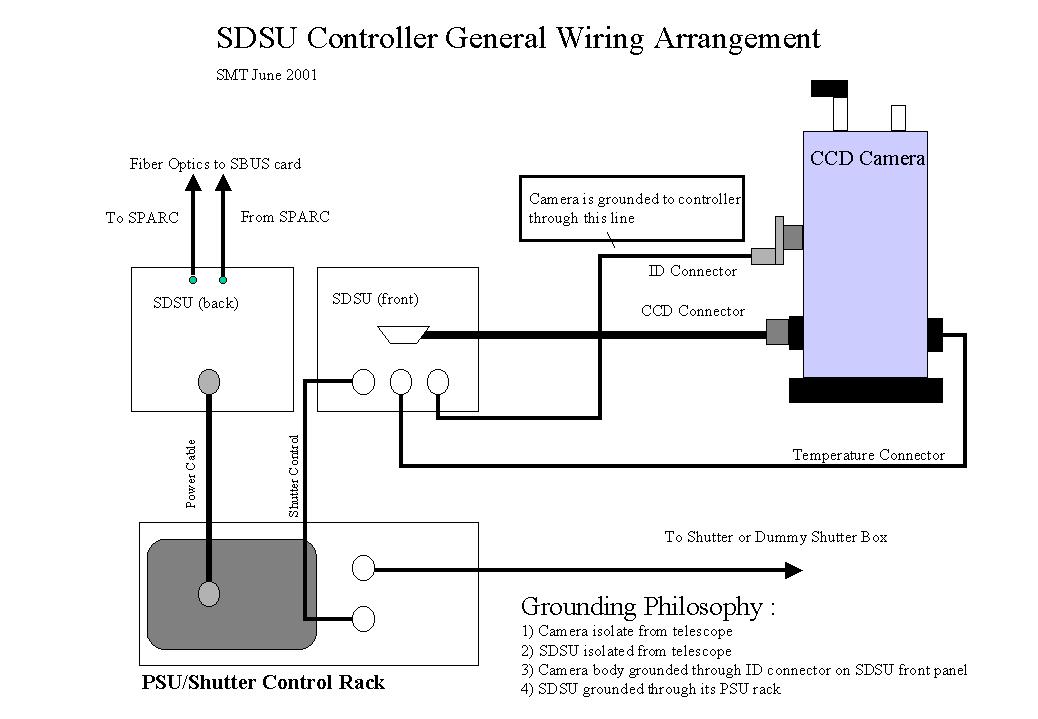
The controller and camera should be connected up as follows : (jpg image) (PowerPoint)
To use voodoo first log in as dspdev onto lpss17. Then
type 'voodoo &'. Then click on 'setup' on the top
menu bar. You then need to tick the following boxes within the setup window
that has just appeared:
Reset Controller
Timing Board
Utility Board
Power On
Image Dimensions
Then select which timing lod file you want to download
by clicking on the directory icon to the far right of the Timing Board name
window. Navigate to the lod file you want to use. Timing lod files are stored
within the /home/dspdev/ccd/tim directory.
Then select which utility lod file you want to download
by clicking on the directory icon to the far right of the Utility Board name
window. With the ING CCD cameras a special 'voodooed' utility file must be
used. This is in directory : /home/dspdev/ccd/util/voodoo.
Image dimensions of a camera can be got from the detector
performance web pages and must be entered in the relevant boxes.
Finally, go to the top menu bar in the setup window labelled
'Master Board' and select 'Utility'. This defines the board that contains
the power on sequence code.
When everything is configured the 'Apply' button can be
clicked at the bottom of the Setup window. Due to a bug in Voodoo you may
need to resize the window to make this button visisble.
The WHTWFC cannot be tested directly using Voodoo. uDAS
treats the camera correctly as a 2 chip mosaic with each chip contains 2154
columns. Voodoo can be configured to deal with a single chip with two outputs
and so emulate the mosaic , but changes are required to the chip dimensions
in timwfc.asm. It is recommended that the WHTWFC only be used under uDAS.
The controller can still be tested using Voodoo but cannot be used for imaging.
With large cameras the image buffer size may need to be
changed from the 'Program' menu at the top of the main Voodoo window.
Commands can be manually sent to the controller (such as
commands to read memory locations) by clicking on the 'Debug' menu option
at the top of the main Voodoo window followed by 'DSP Command'.
Voodoo is quite unreliable and may occasionally require power cycling of the attached controller and restarting of the program.
|
|
|
|||||