| Autoguider TV Focus |
Cass TV( tvscale 12) Focus |
Telescope Focus |
DATE |
| 980 1200 1800 |
8900 8700 8300 |
97,92 97,85 97,88 97,90 |
06/12/04 07/01/05 21/02/05 10/11/05 |
Autoguider:
Use the standard uDAS autoguider for CASS with AUTOFOCUS
2900 (27/5/2004). This was last run from lpss88 (whtdas18), with 'obssys
1', 'startobssys' and 'startag AG6'. No windowing is required.
The monitor should then display a camera mimic showing temperatures
(these are presently rather inaccurate) and camera status. SAOimage display
tool will also appear as well as the TV Guider Control. This GUI allows
you to change exposure times, take fields and set the TV and Guider going.
Images are piped directly to the display tool.
GSS is used for finding guide stars, connect to LPVS3 via LAT
and login as GSS. Select WHT and instrument ISI.
To move the probes, make a remote connection to whtics from the TO monitor.
TV Acquisition:
The ISIS slit is 7.5 degrees tilted with respect to the incident
light beam, so that the reflected light can be picked up by the TV system
to enable slit viewing while observing. There is no filter in the beam (displayed
on mimic in red). The sky can also be seen in AGCOMP mirror position ("direct
view") - beware the X direction is opposite to that in Slit viewing. AGCOMP
position is sometimes used to do a pointing calibrate (less flexure).
To avoid problems with the TFO mechaism (Slide containing TV focal reducing
optics), when ISIS is on this mech is moved to the Barrel position and then
plugged out. This gives an image scale of 18 arcsec per mm.
(The other two positions of the slide are TV Scale 5 (no optics) and TV scale
12).
TVSCALE 18 allows the full unvignetted slit width of 4 arcmin to be seen
on theTV.
The orientation of the sky with Cass TV slit-viewing depends on the sky position angle (PA) and the TV-scale:
      E                     Example for TVSCALE 18                       N
      ^                                                                  ^
      |                                                                  |
      |                                                                  |
      |                                                                  |
PA=0: +------>N   PA=90: +------>E   PA=180: N<------+   PA=270: E<------+
                         |                           |
                         |                           |
                         |                           |
                         v                           v
                         N                           E
The SAOimage display must be flipped the image in the X direction to agree
with the HANDSET X offset direction in Slitview.
Do this by selecting X on the Zoom
menu.
Rotator centre:
After an instrument change you are supposed to determine the rotator
centre and to run the 7 star calibrate procedure, this takes about 20 minutes.
Use TVSCALE 12 and direct viewing, this is the top surface of the
comparison mirror (ICL> AGCOMP). This mirror is believed to be stiffer
than the slit viewing mirror.
Measure the star position on the TV screen (x,y), then rotate 180
degrees and measure again. Calculate the midpoint, this is your rotator
centre.
Calibrate procedure:
Calibrate is done on the rotator centre with the rotator tracking
turned off (USER> ROT MOUNT xxx).
Determine aperture offset:
There is no need for defining an aperture.
Acquisition is done with the slit-viewing mirror in, taking exposures
with TV. A single object is always centred next the rotator centre. The
position can be changed to avoid dust particles on the slit or defects
on the chip. If necessary, perform a blind offset from a reference star
to the science target.
It is easy to accurately recover a position on a following night using
the same guide star. If required log the following parameters: sky PA,
probe position and X- and Y-position of the guide star. On the following
night make sure PA and probe are in position, then type 'USER>autoguide
on x y'.
Autoguiding:
GSS tells us where to move the probe to, in order to pick up light from
suitable guidestars:
The probe positions are giving by the guide Star Catalogue. To get the
suitable guide star use the next script;
Also the GSS can be loaded using the next commands;
Choose a 13-15 mag star from the output list, and send the guideprobe to the required position. There is two options to move the guide probe.
| 1.- |
Using a telnet connection to TAURUS. user: whtobs, pswd:***** in the command line >obssys, folllow by 1, 1 and we have a prompt TO> To send the command to the guide probe use; TO> prag <autoradial> <autotheta>. In the TCS will apper the command send PRAG <XXX> <XXX> |
| 2.- | To move the autoguider we can use the Graphic interface from Taurus. |
Once the guideprobe is in position you take a 'field' using the TV Guider Control (if not in TV mode already). Then start guiding. Check the status on the TCS DISPLAY changes from TRACKING to A/GUIDE.
The polarisation optics significantly reduce the visibility of the slit reflection, so that during exposures, no object can be seen on the slit. Even acquisition is a little more difficult because a multi-aperture DEKKER (usually 3 slots in the spatial direction) is also in the beam above the slit, which reduces the parts of the slit we can see in the TV vierw.
With the slit North-South:
- USER> ROT SKY 0   (position the slit N-S)
- move star to start position right of the rotator centre
    (the star will trail to the left in this example)
- USER> MARK name   (mark start position)
- USER> GOCAT name  (put position data in edit source block)
- USER> DIFF 0 1    (set trail speed to 1"/sec)
- USER> NEXT        (start trail)
The observer must time the exposure according to the differential rate!

With the slit at any angle:
- Use M. Azzaro's program 'diffrates' to calculate the differential rate needed
    for your actual position angle. Use the commands MARK, GOCAT and NEXT as
    shown above.
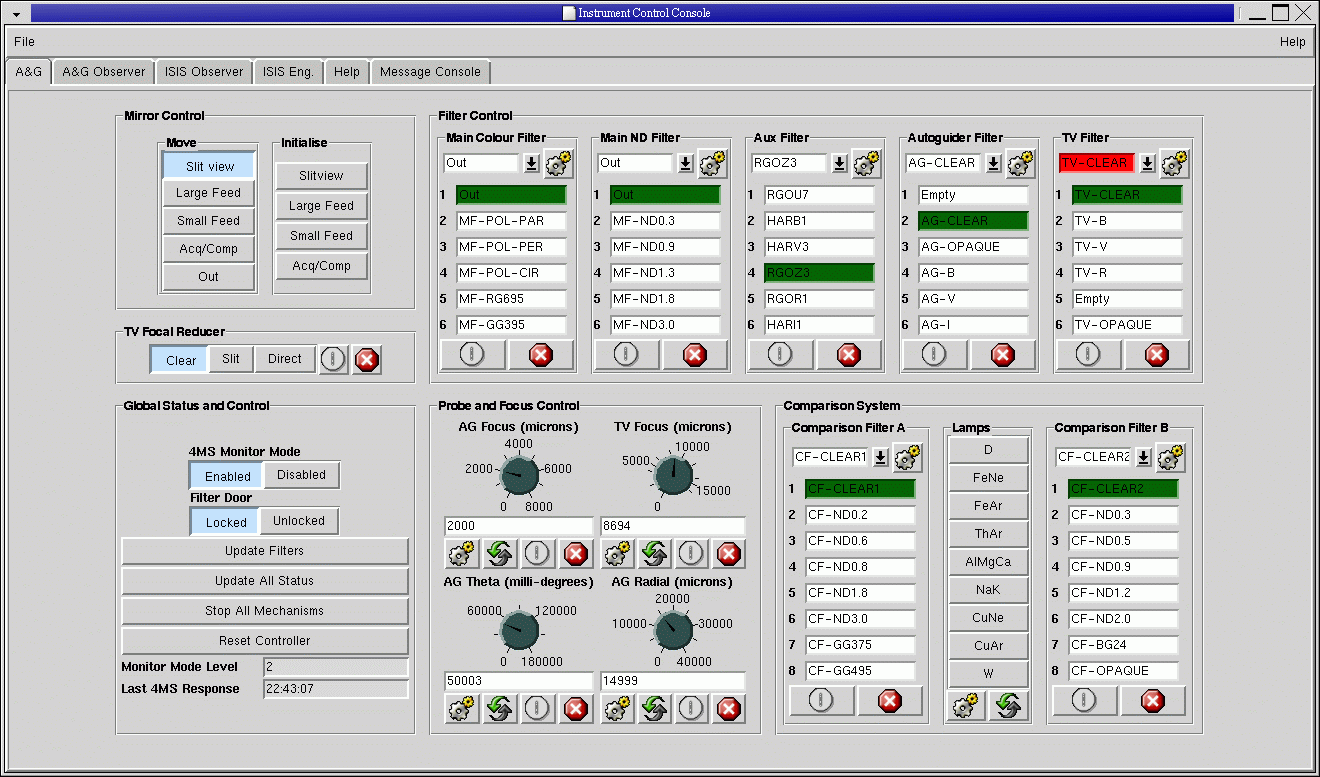
To move any ISIS or AGBox elements it is necesary to do it from the new GUIs in the observer system in Taurus.
The old ICL commands
" ICL>change - select the mechanism to be replaced from the
menu
ICL>dekker 0 (Dekker safely away from slit)
ICL>bfold 0 (Dichroic in outer-most position)
ICL>r(b)filta(b) 0 (Moves the filter holders in outermost-position)"
Replacing optical/dekker units:
Gratings:
-------- © 2004 Isaac Newton Group of Telescopes --------
Last Updated: 10 November 2005 Juan Carlos Guerra jcg@ing.iac.es